
How Zort tracks bets from a photo of your slip
Most bet tracking apps ask you to link a sportsbook account. Zort asks for a photo. That one difference decides whether the app can work for you at all.

Pros
- Reads slips from any bookmaker, shop or exchange, with no account link.
- Free plan is a full tracker with no time limit.
- 160+ currencies with conversion, or track in plain units.
- Manual entry takes decimal, fractional, evens and American odds.
Cons
- Data export is sold in Settings but listed as coming soon on the paywall.
- Nothing settles by itself, so every bet is marked by hand.
- No closing line value, and cashed-out bets drop out of the win rate.
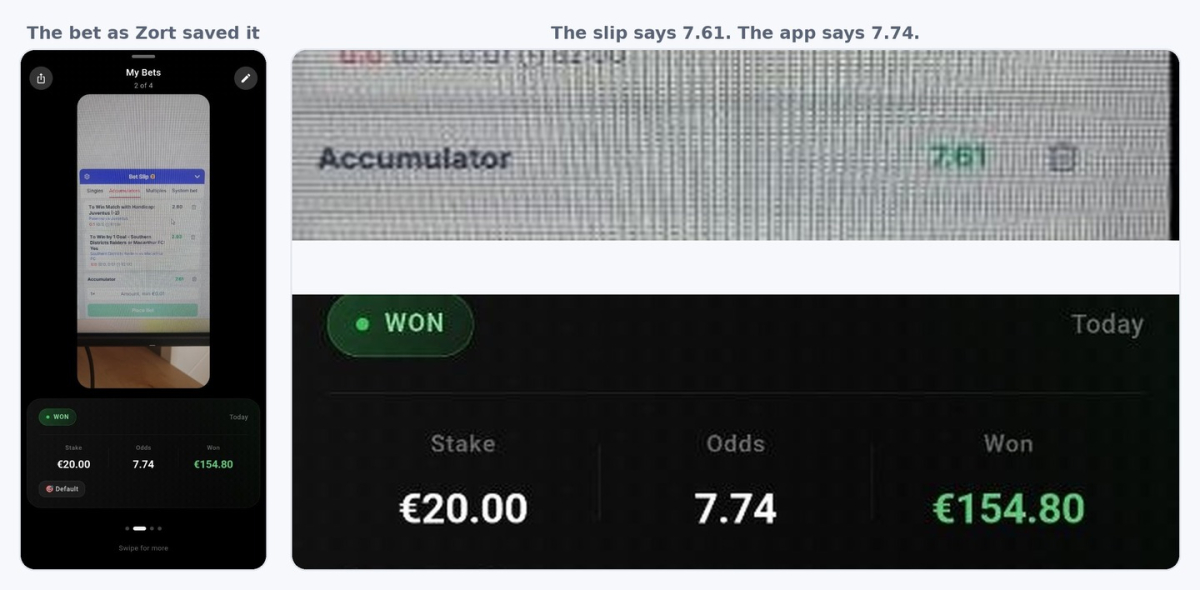
- An accumulator saved at 7.74 when the slip showed 7.61.
A photo instead of a sportsbook login
Zort is a bet slip scanner. You point the camera at your slip, or you upload a screenshot, and the app reads the market, the teams, the date and the odds. It uses OCR, which means software that reads text from a picture. Nothing connects to your bookmaker account. You never give the app a bookmaker password.
The well-known American apps work the other way round. Pikkit, Betstamp and Juice Reel pull your bets straight from your sportsbook account through a sync. A sync is faster than a camera, and it does not miss a bet you placed at a book it supports. It also only covers a list of licensed books in the United States and Canada. If you bet with a European, Asian or offshore bookmaker, you are not on that list.
A scanner has no list at all.
Zort works with any bookmaker
The app is built to read any slip. A paper slip from a shop counter works. So does a screenshot from a bookmaker app, or a bet on an exchange. To the app they are all a picture with numbers on it. There is no support page to check before you sign up. You never wait for your bookmaker to be added.
The money side also suits people who do not bet in dollars. You set a default currency in Settings, and the app supports over 160 currencies with automatic conversion. You can also track in units instead of cash, which is useful if you want to compare results without showing real amounts. Unit size tracking was not in the app at launch. It was added after a user asked for it in a store review.
Zort is free to download on iOS from the App Store and on Android from Google Play. It is published by GIS Analytics Limited, which started the app in 2024, so this is a young product rather than an established name.
How accurate is the bet slip scanner
The developer's website claims 98.5% scan accuracy. Our test suggests you should check every scan anyway.
We scanned a multi-leg bet, the type called an accumulator or a parlay. It had two legs. The bookmaker printed the combined price on its own slip as 7.61. Zort saved the bet at 7.74.
The error is small, and it is hard to notice. The app then does the math correctly from the wrong number, so nothing looks broken: a 20 euro stake showed a 154.80 euro return instead of 152.20. You only find it if you compare the saved bet against the slip.
The single bets we scanned came through correct. The problem sits with multi-leg slips, where the app has to pick one combined price out of several prices on the same screen.
You can fix a wrong price with a tap before you save. You can also skip the camera and use manual entry. Manual entry takes decimal odds (3.75), fractional odds (11/4), evens and American odds, and converts between them for you.
Anyone can log a bet they never placed
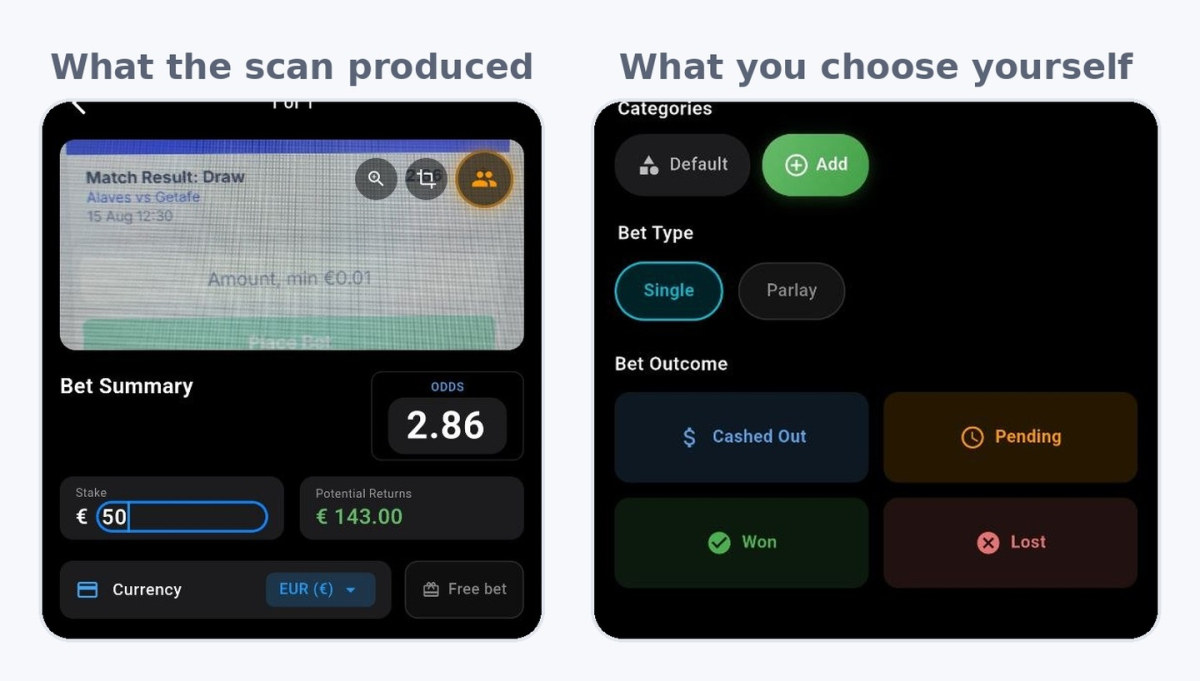
Two of the bets we logged were photos of a laptop screen. The slip was filled in on the bookmaker's site but never confirmed. The stake field still showed “Amount, min €0.01”. Zort accepted both, asked us to type a stake, and let us mark them as won.
This matters for the social part of the app. Zort has friend feeds and leaderboards, and the company says every stat comes from a real scanned slip instead of a self-reported claim. A scan proves that a picture existed. It does not prove that the bet was placed, that the money was real, or that the losing slips were ever scanned. An app that reads your account can make a stronger claim here, because it sees the bets that were actually placed.
Zort does not settle your bets
When you save a scan, the app asks for the stake and then asks what happened. You choose Pending, Won, Lost or Cashed Out. A bet saved as Pending stays pending until you open the app and change it.
Nothing checks the result for you. If you place eight bets on Saturday, your profit and loss is wrong until you come back on Sunday and mark all eight. A user asked the developer for automatic grading. The reply was that it is planned and not built yet. You can also mark a pending bet from your profile with one tap, so the job is quick, but it is still your job.
Cash out behaves in an odd way. One store review claimed that cashed-out bets never reach the statistics. That is not what we found. The bet does count: it appears in the bet total and in the average odds figure. But the app files it as open, not as settled. Our open count went from one to two after a single cash out, and it stayed there.
That changes one number. Win rate is calculated against settled bets only. Our win rate stayed at 66.7%, which is two wins out of three settled bets, even though five bets were logged. So every cash out you take drops out of the win rate while its money stays in the profit figure. If you cash out often, those two numbers describe two different bettors.
What the free plan gives you, and what Pro locks
Settings sells Pro as unlocking “analytics, AI insights and more”. The real split is more specific than that, and in places more generous.
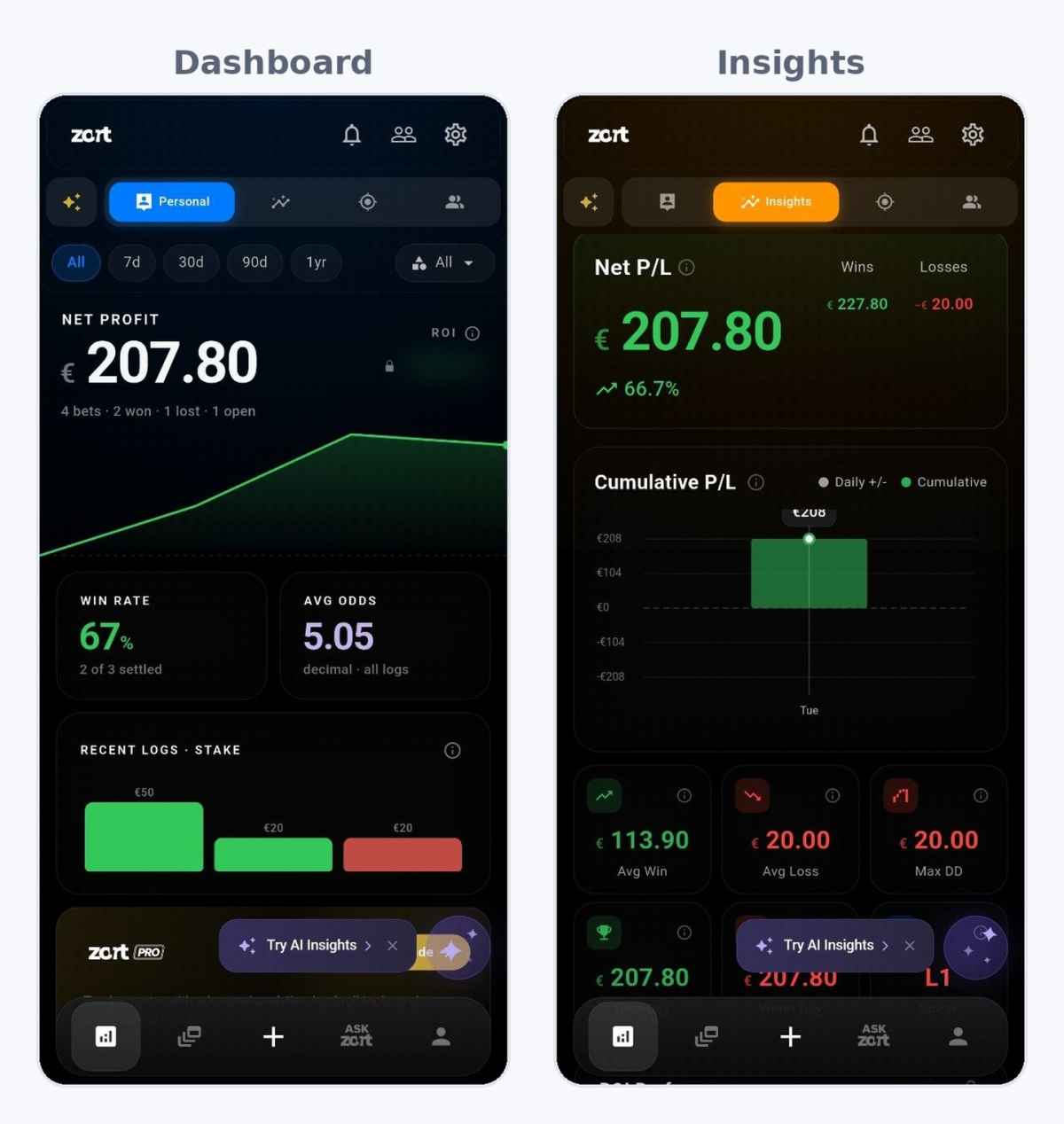
The free plan is a working tracker, not a demo. You get net profit, win rate, average odds, a cumulative profit and loss chart, full bet history, filters by period, average win, average loss, maximum drawdown, best day, worst day, streaks, goals, bet categories and a daily check-in.
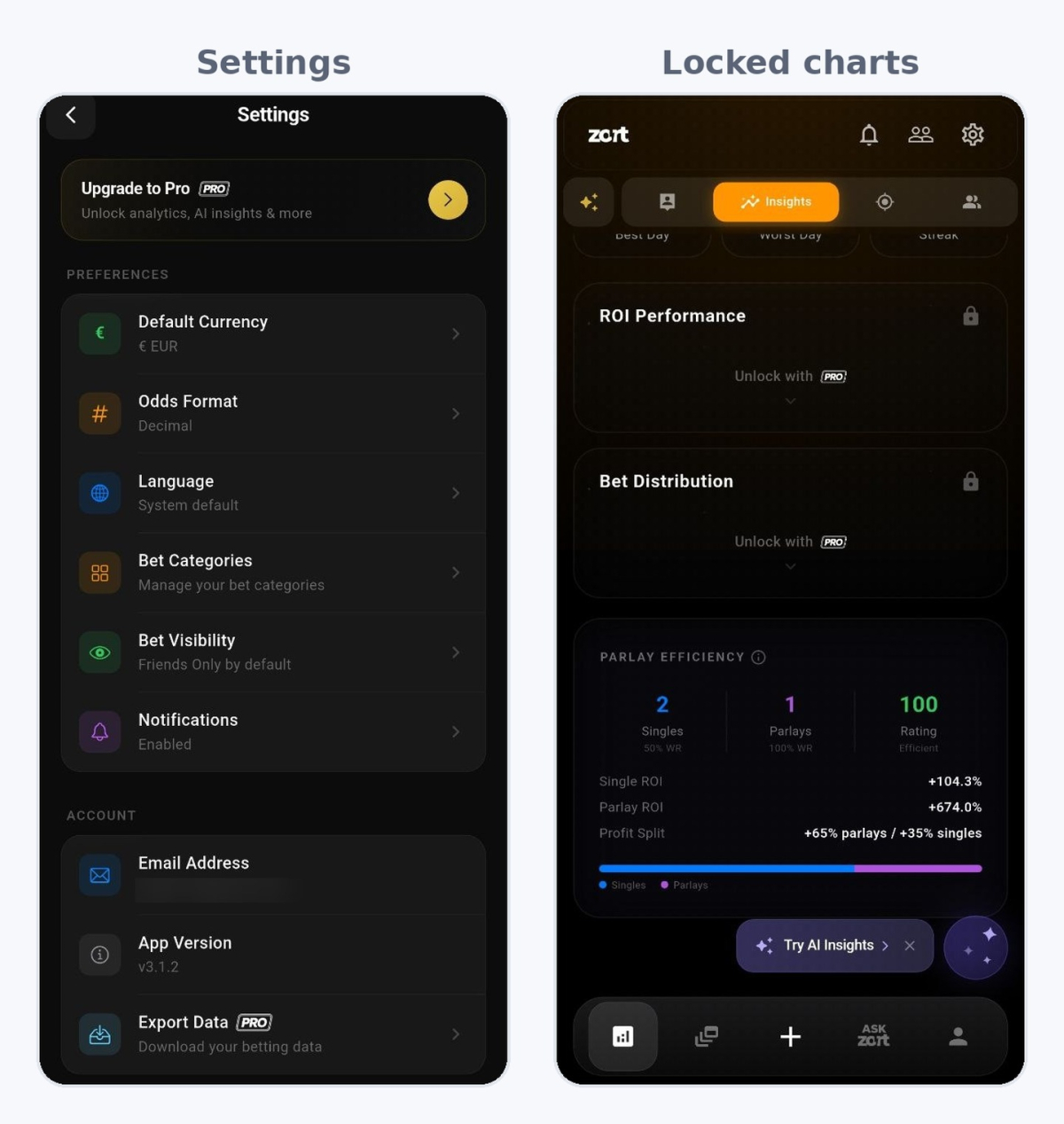
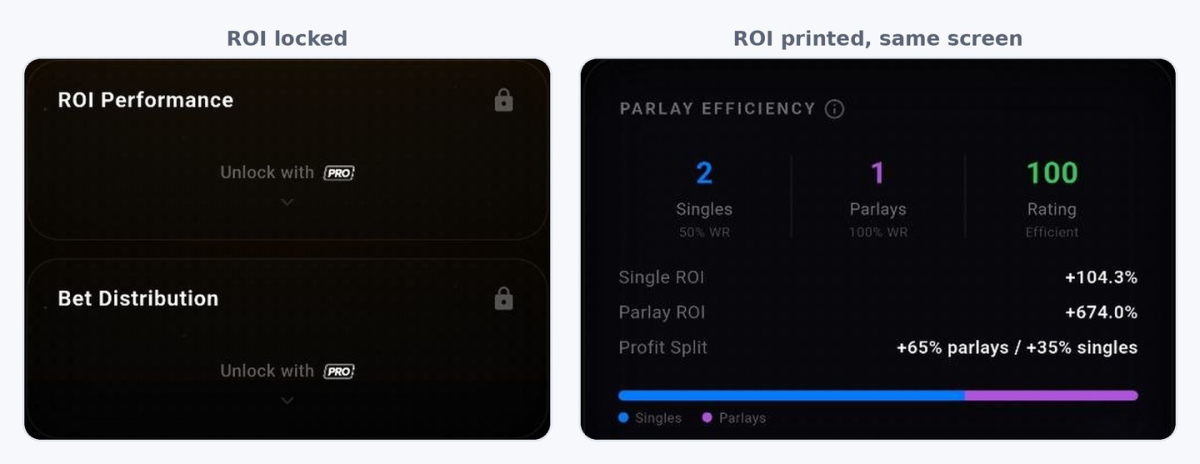
Three things are locked. Two charts on the insights screen, ROI Performance and Bet Distribution, sit behind an “Unlock with Pro” panel. The ROI figure carries a padlock wherever it appears. And Settings offers Export Data with a Pro badge under the words “download your betting data”.
The export you cannot use
Open the upgrade screen and data export is missing from the list of what a subscription buys. It sits in a second list below, headed “coming soon”, next to closing line value and betslip analysis.
So Settings advertises a paid feature that the paid screen says is not built. We did not buy a subscription, so we cannot show what the export button does for a paying user. Put the two screens together and the likely answer is that nobody can export a betting history from Zort right now.
That is worth a moment. If you cannot get your own records out, your betting history stays inside one company's app on their terms. A spreadsheet in Excel or Google Sheets costs you time on every bet, and it does not have this problem.
ROI is locked in three places and printed in two
ROI has a padlock on the dashboard, on your profile and in its own chart on the insights screen. It is also printed in full in two other places.
The first is the social comparison chart, which shows ROI as one of six headline stats. The second is on the insights screen itself. A short scroll below the locked charts sits a free Parlay Efficiency card. It gives single ROI, parlay ROI and the split of profit between them, which is more detail than the locked chart above it.
The paywall here is not drawn carefully. The number they charge for is visible for free if you scroll.
There is a second problem on the same screens. With four bets logged, average odds read 5.05 on the dashboard, labelled “all logs”, and 4.44 on the social chart at the same moment. Neither screen explains the gap, and no obvious rule produces both numbers. When two screens in one app disagree, check your own totals before you trust either.
One more warning about small samples. Our ROI showed 230.9% from three settled bets. Any tracker will print a number like that from three bets, and it says nothing about how the betting is going. The best day and worst day cards showed the same figure, because every bet had been logged on the same day.
Signals: a prediction feed inside the tracker
The Ask Zort tab holds two different things. The first is a chat that answers questions about your own record: which sports pay for you, which bet types lose. That belongs in a tracker.
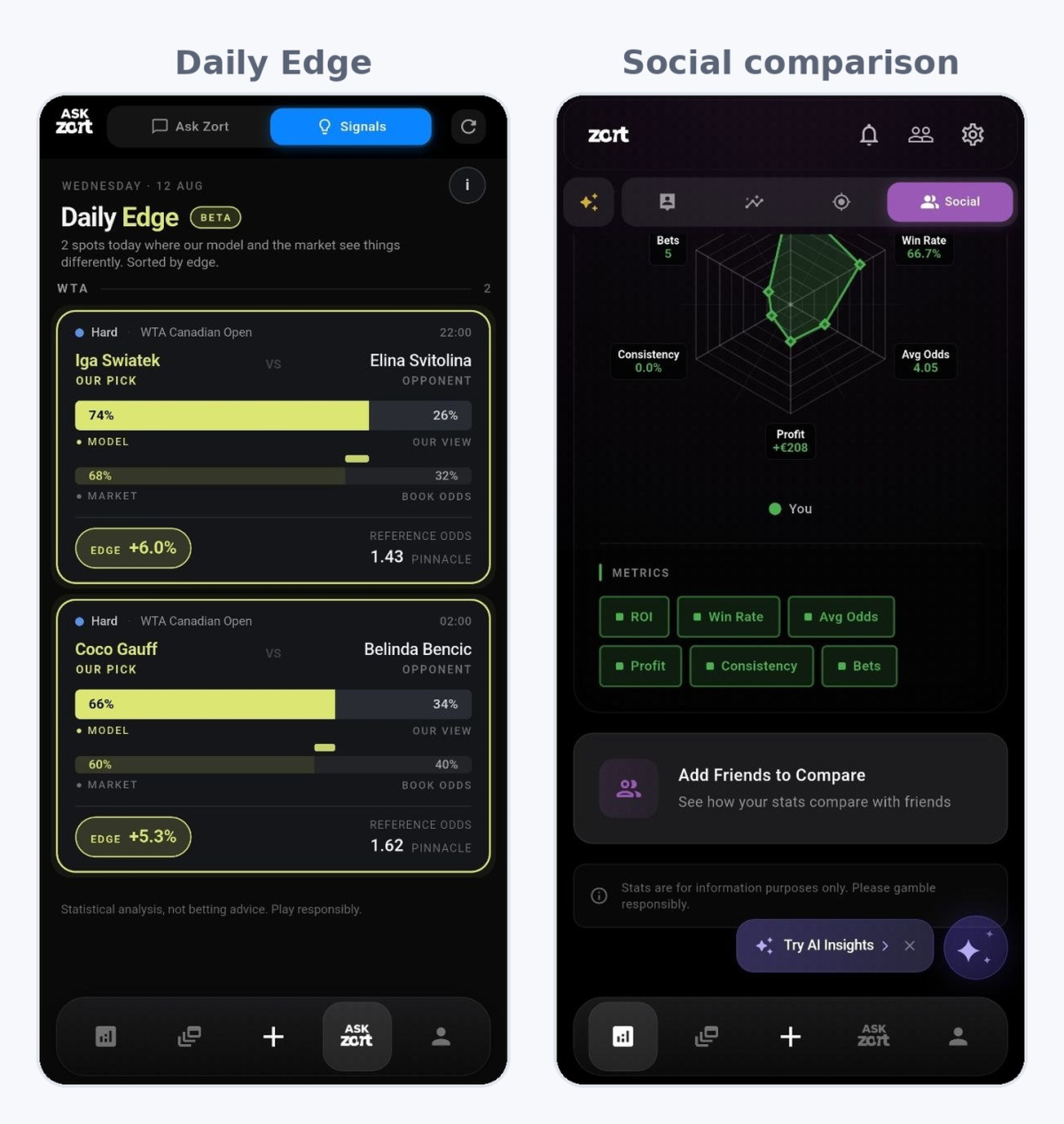
The second is a feed called Daily Edge, marked beta. It is a value betting service. Each card names a match. It shows the model's probability next to the market's probability, prints the gap as an edge percentage, and gives a reference price from Pinnacle. In our session it showed a tennis pick at 74% from the model against 68% from the market, an edge of 6.0%, referenced at 1.43.
The method is real, and Pinnacle is a sensible price to measure against because its margin is low. The feed also carries the line “Statistical analysis, not betting advice”, which is more than most tips services offer.
Older release notes described thirty daily picks with two of them free. The app does not work that way now. Daily Edge showed two cards on a free account, with no locked cards behind them and no upgrade prompt, and the screen said two spots that day. That reads as the model finding two gaps rather than a paywall hiding twenty-eight. Either way the feed is thin, and two picks a day is not a reason to subscribe.
The upgrade screen sells analysis of your own betting rather than this feed, so the picks are not what a subscription buys.
What Zort Pro costs, and the countdown above the price
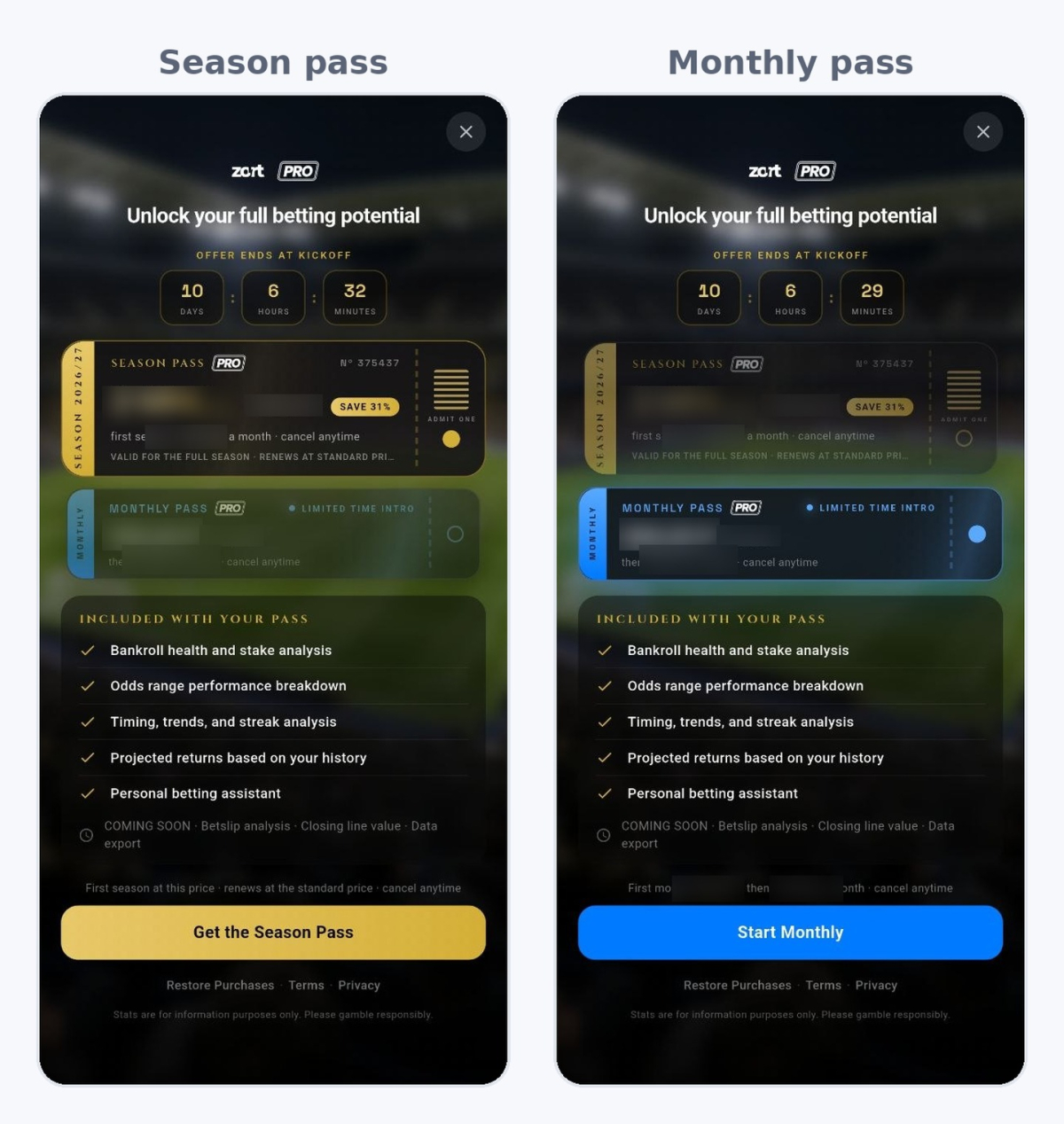
The upgrade screen is designed to look like a match ticket. There is a Season Pass and a Monthly Pass, a serial number in the corner, a stub marked “admit one”, and a countdown headed “offer ends at kickoff”.
The countdown read ten days when we opened it, and it dropped by the minute while we read the screen. No kickoff is ten days away from every user at the same time. It is a deadline built to make you decide now, and it sits above the price.
Both plans are sold at a lower first price with the standard price crossed out beside it. The Season Pass covers twelve months, then renews at the standard price. The Monthly Pass gives one cheap month, then charges the standard monthly rate. The saving shown on the season plan was 31%.
Prices depend on your store country, so there is no single figure worth quoting. What stays the same everywhere is the shape: a discount on the first period, full price on renewal, and a countdown pushing you toward the longer plan. Read the small line under the button before you tap it. The renewal price is there.
Check one thing on your own paywall. The store listing describes a seven-day free trial. The screen we saw offered no trial, only a cheaper first period. If you want the trial, confirm it exists in your region first. Both plans say you can cancel at any time, and cancelling happens in your App Store or Google Play account, not inside Zort.
The pass includes bankroll health and stake analysis, an odds range performance breakdown, timing and streak analysis, projected returns based on your history, and a personal betting assistant.
What Zort does with your data
An earlier version of the store listing said your data stays private on your device. The app does not work that way now, and no longer says so. Bets are stored in the cloud so they sync across your devices. The App Store privacy card declares identifiers that may be used to track you across other companies' apps and websites. They are linked to your identity, and used for advertising, marketing and analytics by third parties.
That is common for a free app paid for by ads, and the release notes say a subscription removes them. It is still a different deal from the one the old wording described. Read the privacy policy on the developer's site before you sign up.
Settings puts bet visibility on friends only by default, and on our profile all five bets sat under Private with none public. That setting controls what other users see. It does not control what the app collects.
Who should use Zort
Zort makes sense if your bookmaker will never appear in a sync list, which covers most of the world outside the United States and Canada. It suits people who place a few bets a week across several bookmakers, in more than one currency, and who want a betting log without building one.
It does not suit high-volume bettors. Fifty bets a week means fifty scans, fifty checks and fifty manual settlements. At that volume the typing is the smaller part of the work either way, and a spreadsheet at least leaves you holding the file.
It also does not suit anyone who needs closing line value, or CLV, which compares the price you took against the price the market closed at. Zort does not calculate it. CLV sits on the coming-soon list instead. The app does reach some market prices already. Its own feed quotes Pinnacle. So CLV looks like a feature they have not built yet. There is a field for logging expected value, or EV, by hand, but that stores your number rather than working it out.
A tracker is only useful if you open it, so the app you keep using matters more than the feature list.
Zort alternatives for a betting log
If you bet with American or Canadian sportsbooks, a synced app will do a better job than any scanner, and Pikkit is the usual first choice. If you want an odds screen and closing line value together, Betstamp covers both.
Everywhere else the real choice is between a scanner app and a spreadsheet you control. A spreadsheet in Excel or Google Sheets costs time on every bet. In return it gives you a file nobody can lock, no subscription, and any column you want. That comparison deserves its own page, and we have written one.
Frequently asked questions
Is Zort free?
Does Zort work on iPhone and Android?
Can I track bets in units instead of money?
Does Zort show closing line value?