
Smart Bet Tracker tested: automatic bet settlement
Smart Bet Tracker is the first bet tracker in our tests to settle a bet by itself. It did so on the free plan, then waited for us to confirm.

Pros
- Settles Betfair markets automatically.
- Lets you confirm automatic results.
- Tracks surebets, wallets and currencies.
- Free CSV export and reports.
Cons
- Wins set in the form book as losses.
- Only 5 bets a day free.
- Fields have icons, no labels.
- Owner and company not named.
This Smart Bet Tracker review covers a free web account: eight bets on football, tennis and darts including a two-leg surebet, the dashboard, reports, export and the bet limit. We did not buy a paid plan.
Verdict: 3.4 out of 5. Automatic settlement works, and the confirm step is a good idea. The rest feels older. Fields have no labels, the free plan stops at five bets a day, and a win set in the wrong place is booked as a loss.
What Smart Bet Tracker is
Smart Bet Tracker is bet tracking software that runs as a web app. There is nothing to download: it opens in a browser on a computer or a phone. You add your bookmakers and wallets, log each bet, and this betting tracker keeps the balance of every account, so your whole bankroll sits in one place.
It works like an accounting system. Deposits, bonuses, fees and transfers are recorded as transactions, so each bookmaker shows its own balance. Events, markets and odds come from Betfair, a betting exchange where bettors bet against each other instead of against a bookmaker. That link is what makes automatic bet settlement possible.
Its home page counter read about 13,900 subscribers and 366,000 bets during our test. That works out at about 26 bets per subscriber.
How to start with Smart Bet Tracker
- Sign up with an email or a Google or Twitter account.
- Add a bookmaker under Accounts. Set the currency carefully, because it cannot be changed after the first transaction.
- Open Bets, then Single bet. Pick the event and the market from the Betfair list, not by typing.
- Tick “Autograde?” and leave the result on Pending.
- After the match, open Bets history and confirm the result with the thumbs-up icon.
Signing up and adding a bookmaker
The sign-up form asks for a name, email, username, country, date of birth and currency. Country starts on United Kingdom and currency on “Euro Member Countries”. Two optional fields are for an affiliate code: users who invite friends get 50% of their first subscription.
Adding a bookmaker is harder than it should be. The form has no field labels at all, only icons. A house means the account name. A chain link means the bookmaker's website. A dollar sign means currency, and that list starts on Afghanistan Afghani, simply because it comes first in the alphabet.
The form’s right half asks for a username and a password, with a lock icon. Next to a bookmaker's name, they look like the login details of your bookmaker account. A tracker that only records bets has no reason to hold them, and the form does not say why it asks. We left both empty, and everything worked. Nothing in the app connects to a bookmaker: every bet is typed in or picked from Betfair's lists.
The bet form: icons without labels
One form covers every bet. On top: bookmaker, stake, date, a free bet box and commission. The stake field says “Stake (or liability)”: on a lay bet, where you bet that something will not happen, you enter the amount you could lose. Below: sport, country, competition, event, market, outcome, odds, tipster, result and tags.
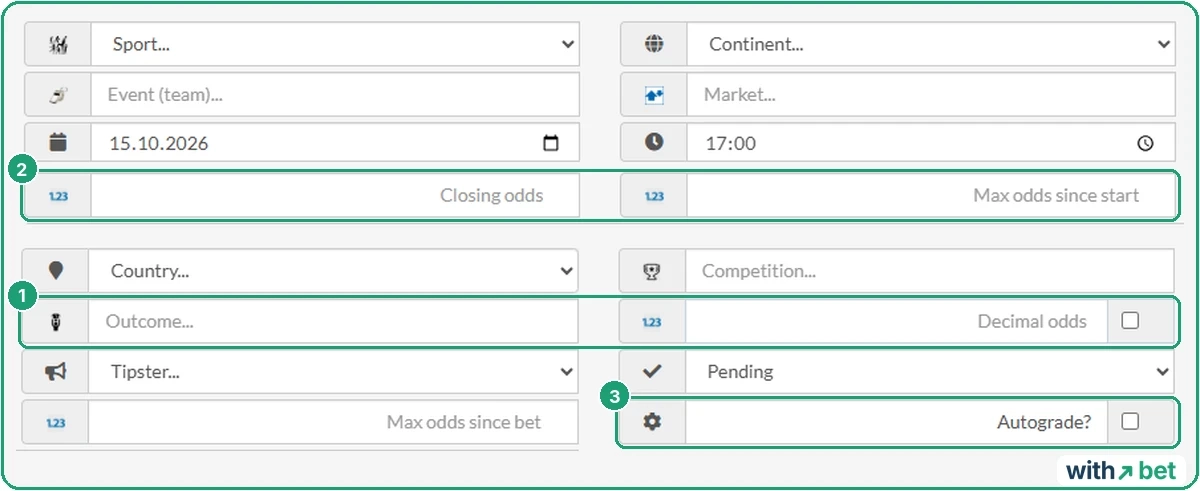
Three odds fields stand out: closing odds, the highest odds since the market opened, and the highest odds since you placed the bet. Closing odds are the last price before kick-off, and closing line value (CLV) is built on them, which our closing line value guide explains. The app stores the numbers. We did not find a report that turns them into CLV.
Without labels, the outcome field and the odds field are easy to mix up. On our first two bets the odds went into the outcome field, and the odds field kept its default of 2.00. Nothing warned us. Both bets were saved with the wrong price.
Auto-settle works on Betfair markets
Pick an event from Betfair's list, click the market field, and the list splits in two. Green: “Betfair markets (autogradable)”. Red: “SBT markets (non-autogradable)”, the app's own markets such as correct score, handicap, over/under and both teams to score.
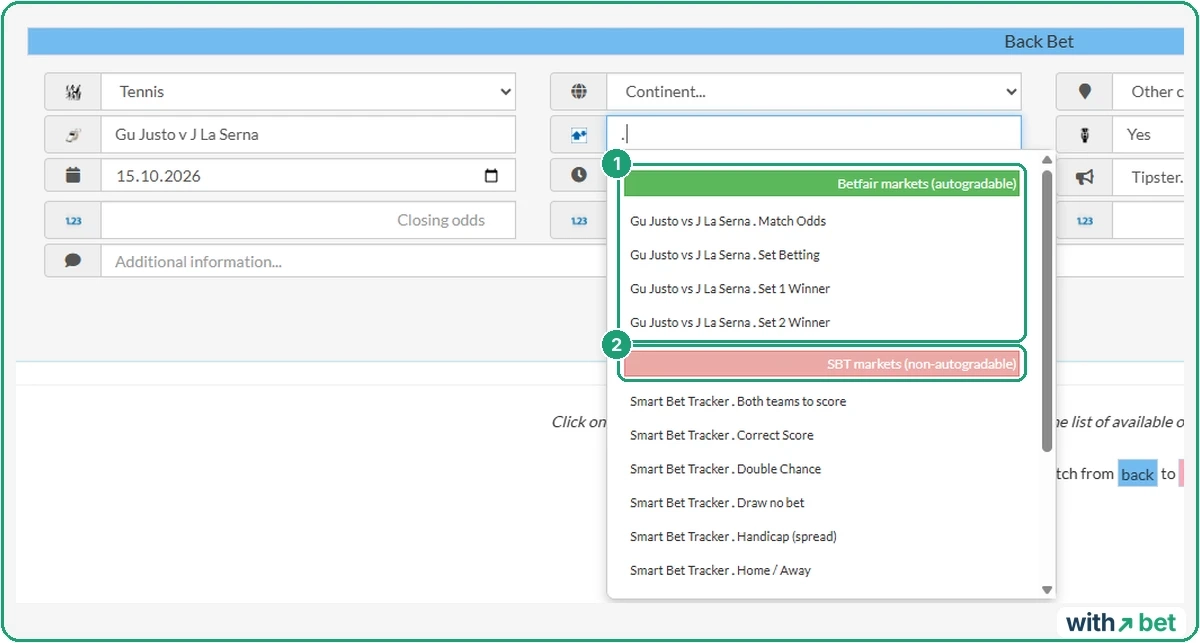
So automatic settlement, which the app calls autograde, depends on two things: the event must come from Betfair's list, and so must the market. For our tennis match that meant four markets: Match Odds, Set Betting, Set 1 Winner and Set 2 Winner.
We logged 100 euros at 2.10 on Guido Ivan Justo in a Challenger match, a lower-level tennis tournament, and ticked “Autograde?”. A control bet on a football match, typed in by hand on an SBT correct score market, also had the box ticked.
By the next morning the tennis bet had moved to Settled as Lost. We had not touched it. The football bet was still Pending.
The plans table marks “Automatic settlement” as unavailable on Free and Newbie. Our free account settled the bet anyway. We cannot tell whether that is a trial for new accounts or an out-of-date table.
A retirement shows why you confirm
An extra thumbs-up icon appeared on the settled bet. Its tooltip reads “Confirm autograded bet”. The result is filled in, but it waits for you.
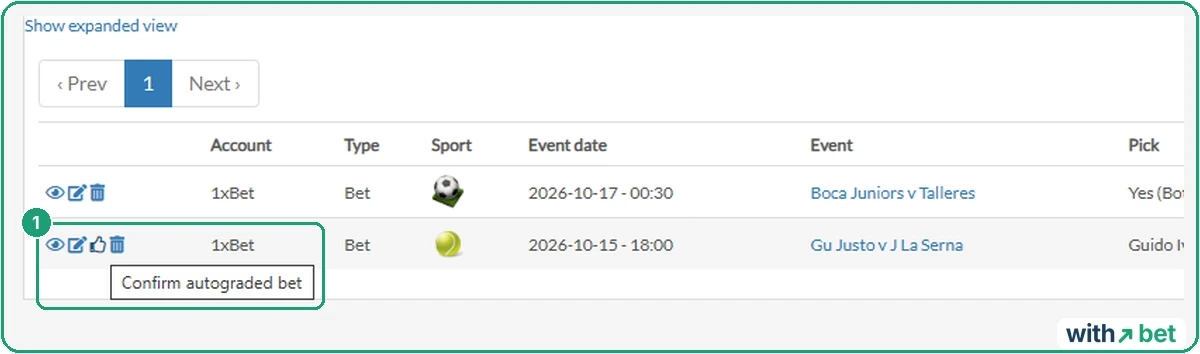
In our test it mattered. Justo retired, or stopped playing, after losing the first set 1-6, at 0-0 in the second. The app booked our bet as lost, minus 100 euros, because the other player went through.
Bookmakers do not all agree. Many settle on the player who goes through, which matches the app. Others keep bets only if a full set was played, and here one was. Some void every bet on a retirement, and then the right entry is 0, not minus 100. The app cannot know your bookmaker’s rules, so read them before you confirm.
Confirming does not lock the bet. We confirmed the result, the thumbs-up icon disappeared, and we then switched the bet to Void in the bet list. The app recalculated it straight away: payout 100.00, profit 0.00.
Automatic settlement follows the result from Betfair, not your bookmaker's rules. A retirement is where the two can part ways.
Times in the app are in UTC, the world reference time. Our match showed 18:00 in the tracker and started at 21:05 on a live score site set to UTC+3, three hours ahead. The app does not mention the time zone anywhere.
Manual bets: Won before kick-off
Everything outside Betfair's lists works like every other tracker we have tested: you set the result yourself.
On 15 October we added Boca Juniors v Talleres, a match starting on 17 October, and saved it as Won. The app accepted it. Bet-Analytix and mybets.gg did the same in our tests. In every tracker we have tested, a result you type is a result the app believes.
A win booked as a loss
That same Won bet showed a payout of 0.00 and a profit of minus 10.00. The dashboard counted it under Lost.

It happened again on a second bet, on tennis: 45 euros at 1.96, saved as Won. Payout 0.00, profit minus 45.00.
How do you fix it? Switch the result in the bet list to Lost and back to Won, and the numbers correct themselves. The Boca bet then showed a payout of 19.00 and a profit of 9.00, and the dashboard moved it to Won. Same bet, same result, a 19-euro difference depending on where you clicked.
If you set results by hand, set them in the list, not in the form. Then check the Payout column.
The dashboard and 14 reports
The dashboard shows initial and ending balance, stake, return, yield, ROI, and won, lost and void counts, for any period from today to all time.
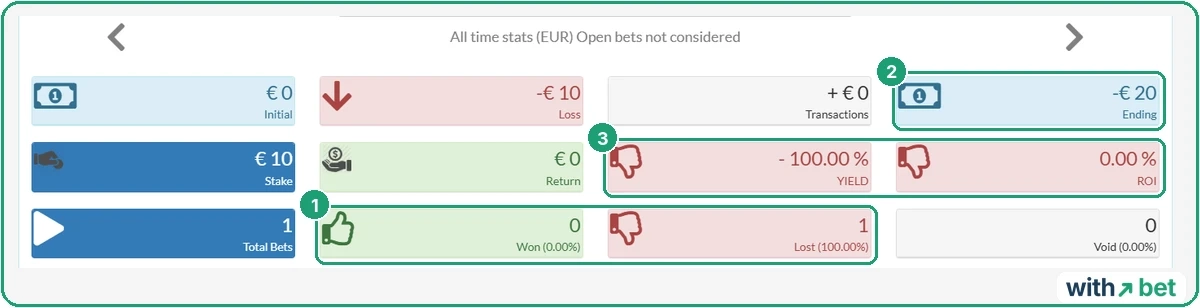
Two numbers do not hold up. The header says “Open bets not considered”, yet the ending balance included our open 10-euro bet: minus 20 euros, where the settled bets alone gave minus 10. And once the Boca bet was fixed, yield read 90% while ROI stayed at 0.00%. Yield is profit divided by the money staked (9 / 10 = 90%). ROI here seems to divide by the starting capital, which was zero.
Betting reports are a separate menu. There are 14 of them, and up to five run at once. They cover profit by bookmaker, sport, competition and tipster, ROI and yield over time, and balances. Two stand out: “Bet pattern analysis” and “Staking plans comparison”.
We ran Global Indicators on the free plan, and the result can be downloaded as JSON. The totals add up: 215 euros staked, 119 returned, minus 96 profit across four settled bets. Besides the three bets above, they include 60 euros on a darts match at 2.30, which lost.
The report also confirms the bug above. Two of our bets showed Won in the list, yet the report counts one win, two losses and one void. And it treats the void as a real bet. The 100-euro stake that came back still sits in the totals, so yield reads minus 44.65% (-96 / 215) and hit rate 25% (1 win in 4). Leave the void out, and yield is minus 83.5% (-96 / 115) and hit rate 33%.
Surebets: tracked, not calculated
A surebet, or arbitrage bet, covers every outcome of one event at different bookmakers, so that one bet wins whatever happens. Smart Bet Tracker works as a surebet tracker too. It has its own form for them, with an account, stake, odds and outcome per line.
We built one on Over and Under 2.5 goals: 2.10 at one bookmaker, 2.05 at another. That is a real surebet, because 1/2.10 + 1/2.05 = 0.964, below 1.
A calculator icon sits in the corner of the form. Pressing it closed the form and lost everything we had typed. We entered the surebet again with 50 euros on each side. The app saved it without suggesting better stakes.

With 50 and 50, Over returns 105 euros and Under 102.50, so the profit depends on the result. Stakes of 49.40 and 50.60 return about 103.70 either way. Our surebet calculator gives that split in a second. If surebets are new to you, start with our guide on how surebet scanners work.
Free plan: five bets a day
The free plan allows five bets a day. In our count, a two-way surebet used two of them. After the fifth, a page says “Your current subscription has reached its bets limit”.
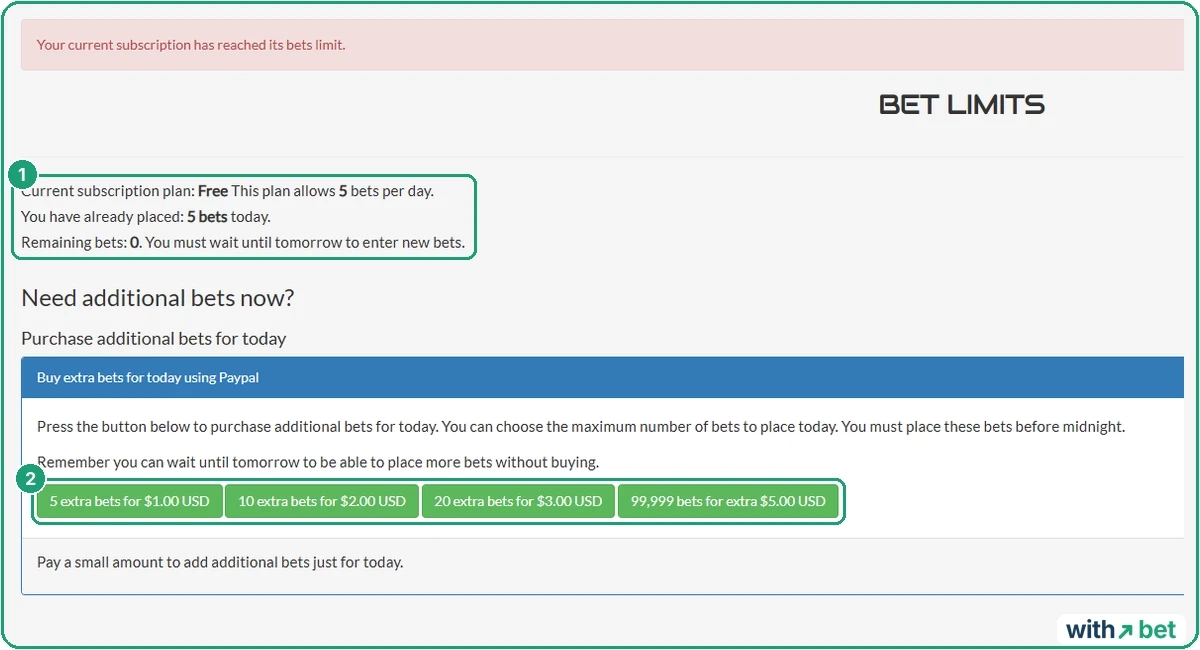
You can wait until tomorrow or buy extra bets for today, to be used before midnight: 5 for $1, 10 for $2, 20 for $3, or 99,999 for $5. Payment goes through PayPal or, for crypto, CoinPayments.
Three two-way surebets a day already need six bets.
Six plans and a Bitcoin offer
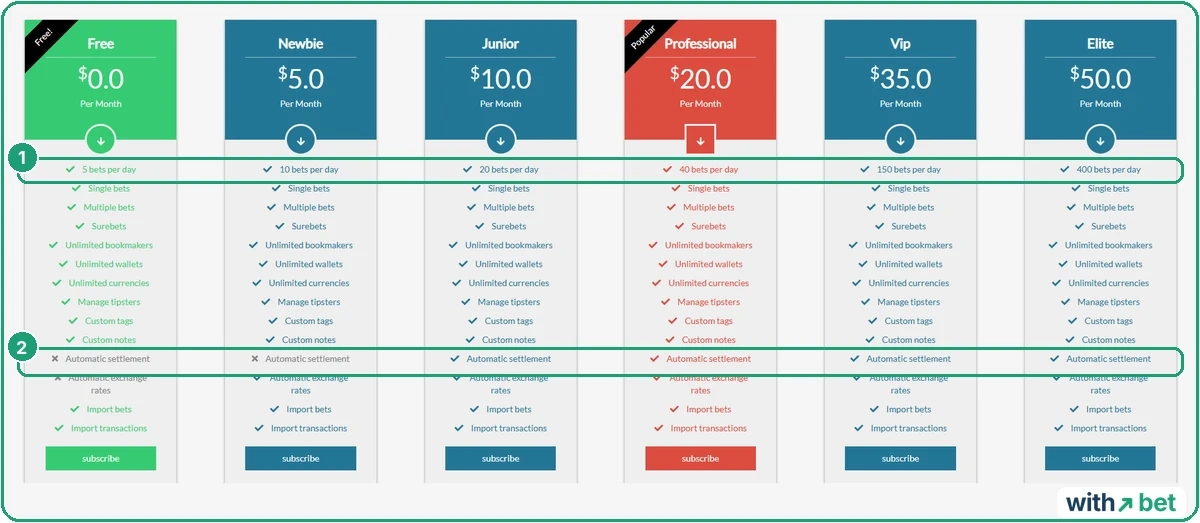
Paid plans differ mainly in the daily limit.
| Plan | Price per month | Bets per day | Automatic settlement |
|---|---|---|---|
| Free | $0 | 5 | No, per the table |
| Newbie | $5 | 10 | No |
| Junior | $10 | 20 | Yes |
| Professional | $20 | 40 | Yes |
| Vip | $35 | 150 | Yes |
| Elite | $50 | 400 | Yes |
Singles, accumulators, surebets, unlimited bookmakers and wallets, tipsters, tags, notes and import come with every plan. Automatic exchange rates start at Newbie.
A banner on the dashboard advertises “Bitcoin madness”: a year of Professional for $99 in crypto, against a crossed-out $240. The headline promises “less than half the monthly price”. The monthly price is $20. What it means is less than half the yearly price: $99 is 41% of $240.
Who runs it, and export
No company, country or address is named anywhere on the site. The contact page has one “Email us” button. A directory listing calls Smart Bet Tracker “a software and consultancy company” and shows no reviews.
Export is free. Bets and transactions are exported separately, as CSV-style text files with a separator you choose, ready for Excel, Google Sheets or LibreOffice. The file takes a few minutes to prepare, and the download link works for 24 hours.
A public Tipsters page lists users who share their bets, with “View tips” and “Follow” buttons. Since results there can be typed by hand, treat their records like any other self-reported record.
Smart Bet Tracker against other trackers
All four trackers we have tested accept a result you type. Smart Bet Tracker is the only one that can also fill in a result itself.
| Feature | Smart Bet Tracker | Bet-Analytix | Zort | mybets.gg |
|---|---|---|---|---|
| Platform | Web | Web and apps | App | Web |
| How a bet gets in | Typed, Betfair lists | Typed or CSV | Phone camera scan | Screenshot read by AI |
| Auto-settle | Betfair markets, you confirm | No | No | No |
| Surebets | Yes | No | No | No |
| Free limit | 5 bets a day | 200 bets per bankroll | ROI locked | 15 scans a month |
| Export | Free | Free CSV | Not available | CSV on Pro |
Want more statistics for free? Our Bet-Analytix review covers that. For scanning, see Zort and mybets.gg. Our bet tracker hub explains how a bet reaches a betting log.
Who Smart Bet Tracker suits
Bettors whose bets are on markets Betfair lists get the most from it: those bets can settle themselves. Surebet and matched bettors get a balance for every bookmaker and wallet, in any currency.
It suits less well if you bet more than five times a day and do not want to pay. The same goes for bets on markets Betfair does not list. Then you are back to typing results, in an interface without labels, and to checking that a win was not booked as a loss.
Frequently asked questions
Is Smart Bet Tracker free?
Does Smart Bet Tracker settle bets automatically?
Do I need to download Smart Bet Tracker?
Is Smart Bet Tracker safe?